HOME VHDL CODES C PROGRAMS SOCCER BUZzz TECH INFO

                   ENCRYPT YOUR FILES


Encrypting is one of the best ways to keep your stuff from being viewed by others. This feature is essential when you have too delicate files to be kept secret.
NTFS provides a feature of encrypting your files in professional, enterprise and ultimate versions of windows 7.
To encrypt, follow the following steps,
  • *  Right click the folder you want to encrypt and select the properties.


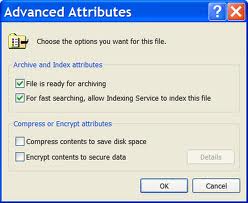
  • *  Then on general tab, click on the advanced button.
  • *  Now enable the ‘Encrypt to secure data’ option and apply the changes.


*  Now the encrypted folder name is shown with green colour text.
*  Don’t forget to keep file encryption key backed up.
But if you login through the same account and try opening the file, you’ll be astonished to see that it opens without intervening for password. This is because it prompts for password or anything else only if other user through their account tries to open it..!
It can be opened when tried from the same account through which it was encrypted, but others aren’t allowed even if other user too has an account with the same user name and password.
While you encrypt, windows will show a message at the right bottom corner to back-up your file encryption key, don’t forget to click that.
If you fail to do so then follow these few steps,
*  Click on ‘start menu’ and type ‘certmgr.msc’ in search box.
*  A new certificate window pops-up, expand the ‘personal’ folder on the left pane and then open the certificate folder.
*  Then you’ll find your certificate resting, double clicking which opens certificate properties and on ‘details’ click the ‘copy to file’ button. There you have your key (FES).
When you copy or move an encrypted file from NTFS to FAT32 drive, windows automatically decrypts it.


Hope you liked this..!!
If any queries or suggestion please comment or mail me to jazzamd786@gmail.com
Please do comment and help me to improve the way to present the posts and to add more info in it. Even if you like to know about anything else please do mail and I’ll assure to bring to you as much information I can.
Thanks…!!! J

               GET EXTRA DISK SPACE
Nowadays we load lot of stuffs like software’s, games and many more applications. These consume a lot of disk space which make us worry when insufficient space is available.
The best idea to free some disk space is to compress the folders or drives. To compress,


  • *  Right click on the folder to be compressed.
  • *  Select properties, then on general tab click ‘Advanced’ button.
  • *  Now enable ‘compress contents to save disk space’ option and apply changes.

Now you’ll encounter that you’ve got some few extra racks. The compressed folder names are shown in coloured text.
But beware! Not to compress C: drive because compressing these system files would surely affect your computers performance.


Hope you liked this…!
If any queries or suggestions please comment or mail to jazzamd786@gmail.com ,so that I can improve this and even my future posts.
Please do comment whether you liked it or not..!
Thank you…!!! J


                            FET (Field Effect Transistor)


FET, a type of semi-conducting device which is comparatively more efficient than so called BJT’s .
FET can described to be a device which controls output current by changing voltage at one of the transistor terminals and it requires less input current than BJT.


They are of two types,

  • Junction-Gate Field Effect Transistors.
  • Metal-Oxide Field Effect Transistors.


MOSFET’s (Metal-Oxide Field Effect Transistors) are the one which are widely used.


MOSFET has 3 terminals all made of metal, those are source, gate and drain. Source and drain are connected to two separate region of n-type semiconductor which are separated by a p-type semiconductor region. Along one side of p-type there is a thin layer of silicon dioxide. The layer serves support to gate terminal and insulates it from p-region. 


Gate can be polysilicon (has capability to form self-aligned gates) or metallic gates (which have the ability to increase the speed of operation). 


In MOSFET’s the current cannot flow between source and gate until a positive voltage is given to gate, this electric field which the gate produces extends through the oxide layer. This field then draws electrons from p-type region into a thin channel along the oxide layer. Thus the channel forms a conductive path in the p-type region between the source and the drain, allowing current to flow between the source and the drain.


A small change in the applied gate voltage results in large change in current between the source and drain. It is used as a switch because if no voltage is applied to the gate terminal then the current in source-drain circuit is completely blocked or if voltage is applied then the resistance offered to current flow in the source-drain circuit is eliminated depending on the voltage applied to gate.


I hope u like this post....! if any queries, you can mail or post a comment.! if u would like to know anything about other electronic device..i would be happy to explain it to u..!! please do comment..!
even ur suggestion would help me to improve my post..!
   

Thank You!!

This program will help u to separate tokens and print them........!!!!


#include <stdio.h>
#include <string.h>
int main()
{


  char text[80];
  char *token;


    printf("Enter a sentence:\n");
gets(text);
    token=strtok(text, " ");


    while(token != NULL)
    {


    printf(" %s\n",token);


    token= strtok(NULL, " ");


    }
}


please mail if any error in this given program or any clarification.....!!
please do comment...!!!!!!

THANKS YOU..!!

This below given c program gives you a clear view as how to place N queens in N*N matrix.......!!!!!!!!!
check it out.......!!!!!!


#include <stdio.h>
#include <conio.h>
int chess(char Array[100][100] ,int, int row);
int check(char Array[100][100],int,int row,int direction);
int main()
{
int N;
char chess[100][100]={};
printf("enter value of N\n");
scanf("%d",&N);
chess(chess,N,0);
{
int i,x;

for(i=0;i<N;++i)/*prints the result*/
{
printf("\n\t\t\t");
for(x=0;x<N;++x)
{
if(chess[i][x]==0)
printf("*");
else
printf("%c ",chess[i][x]);
}
}
}
printf("\n");
}
int chess(char Arr[100][100] ,int N, int row)
{
int direction=0;

if(row==N)
return 1;

while(direction < N)
{
if(check(Arr,N,row,direction)) /*checks out the row*/
{
Arr[row][direction]='Q'; /*places a queen on the board*/
if(chess(Arr,N,row+1))/*recursion takes place*/
return 1;
Arr[row][direction]=0;/*corrects out the change made*/
}/*returned 0*/
direction++;
}
return 0;
}
int check(char Arr[100][100],int N,int row,int direction)
{/*checking out just the left size*/

int r,d;
r=row;
d=direction;
while(r >= 0 && d >= 0)
{
if(Arr[r][d]=='Q')
return 0;
--r;
--d;
}

d=direction;
r=row;
while(d < N && r >= 0)
{
if(Arr[r][d]=='Q')
return 0;
++d;
--r;
}

d=direction;
r=row;
while(r >= 0)
{
if(Arr[r][d]=='Q')
return 0;
--r;
}
return 1;
}


so this particular program will give u the required answer.......!!!!
any doubts or clarification please mail to the the below address :
jazzamd786@gmail.com
please do comment..!

THANKS


Why Silicon diode is preferred over Germanium....?
Some reasons for this are,

  • Silicon(Si) has got a forward voltage(potential barrier) of 0.7V greater compared to Germanium(Ge) which has 0.3V .Due to which its forward resistance is a bit comparatively high compared to Ge upto forward voltage,which increases is forward maximum current value.
  • Secondly the reverse current in silicon flows in order of nano amperes  compared  to germanium in which the reverse current is in order of micro amperes, because of this the accuracy of non-conduction of the Ge diode in reverse bias falls down.Whereas Si diode retains it property to a greater extent i.e., it allows negligible amount of current to flow.
  • Further the Si diode has large reverse breakdown voltage about 70-100V compared to Ge which has the reverse breakdown voltage around 50V. 

Thus these above simple reasons give a good description as to why Silicon diodes are preferred over Germanium.


Any questions regarding this topic or the above given points can be posted in comments or to the below mentioned mail id.. Please post a comment regarding whether you liked it or not.
jazzamd786@gmail.com


thank you!

Need to download stuffs for free.......!! Either games or movies.......!!!!
Then follow this:
^ if u are a windows 7 or xp user then visit.: http://www.torrentz.com/
or else just type torrent for windows 7 or xp......
^ then download torrent from that particular site........
^ later visit http://www.picktorrent.com/ or the same www.torrentz.com...
^download the respective file needed.....
^ then go to utorrent and file>open and point out the torrent file u just dwnloaded
it wil start dwnloading...........
^ so now you have finished downloading it...!!!!
enjoy......!!!!

Total Pageviews

About this blog

Contributors

Followers

Powered by Blogger.

Labels